

If you’re overwhelmed by endless to-do lists, I’m sharing my top methods to help you prioritize and simplify your day.

Tools
The only tools you truly need for managing your tasks & schedules are a calendar & a task management system. Personally, I’ve been using Notion for both – A calendar database for scheduled appointments as well as daily task lists, and a separate task database influenced by the GTD & the Eisenhower Matrix systems.
Daily Task Prioritization
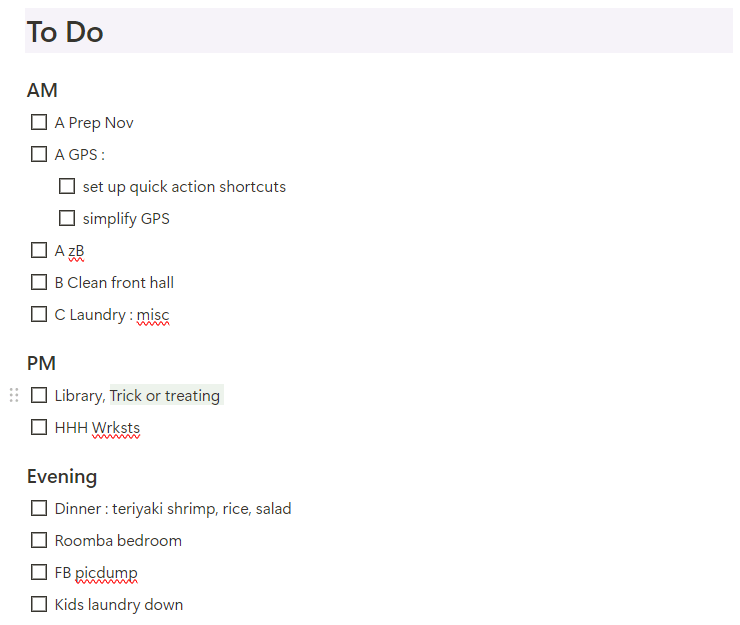
Each day, my task list is divided up by “morning”, “afternoon”, & “evening”. This is a version of the “Time Boxing” method that I started using with the Happy Planner, and it’s been immensely helpful. To schedule my days, I simply add tasks to the “box” when I can work on those tasks during the day.
I then effortlessly prioritize the order in which I actually do those tasks using Franklin Covey’s ABC method :
- A = Must do
- B = Should do
- C = Would like to do
From there, I sometimes number them to prioritize what order I will actually do these tasks. The major benefit of this system on Notion is that I can easily drag & drop the items in the order that I want to do them. If I didn’t have time during the morning, I can easily move them to another block of time later in the day.
Managing General Tasks
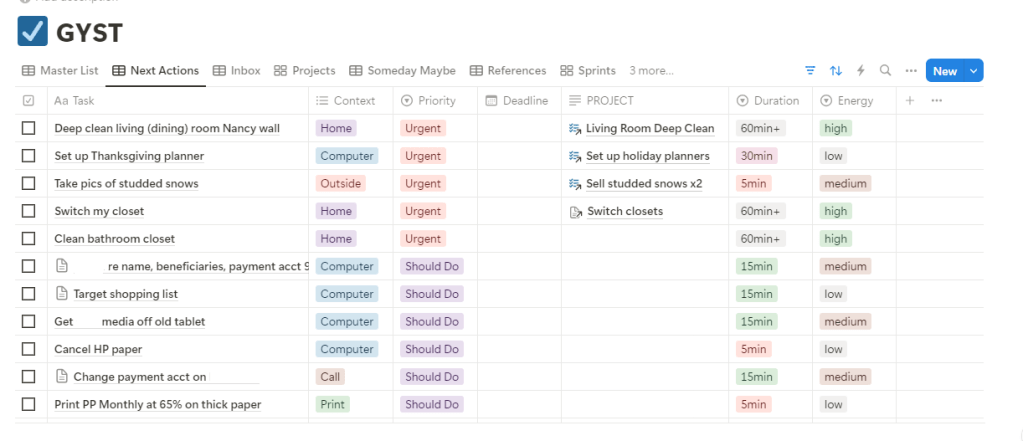
For tasks that don’t have a deadline, I manage them in a separate Notion database that I call my “GYST” (Get Your Shit Together) list. Notion database properties come in handy for this system, as it is heavily influenced by the GTD method & the Eisenhower Matrix method.
The base of the database is a “Master List”, which I never look at because everything is organized into different views from there.
Anything & everything goes into my “Inbox” tag : next steps for my blog, purchases made throughout the day, anything that I need to remember. I review & organize this information every morning before I set up my daily task list.
There are several other tags I use too (”Someday Maybe”, “Waiting On”, etc), but for the purposes of this post, we’ll be focusing on my “Next Actions” list – this is for things that need to be done sooner than later.
I have a formula set up that will tell me where to put certain items based on the “Eisenhower Matrix”. For example, if I click that a task is “urgent” & “important”, it will tell me to put it in the “Next Actions” list as “Urgent” priority. Another example is if it’s “not important” & “not urgent”, it will suggest the “Someday Maybe” list.
Other GTD inspired properties I use include the energy I assume the task will take, the time I assume it will take, the context (such as home, errands, computer), & any associated links (such as project pages). These are for me to be able to easily pick something to accomplish if I find myself with some free time.
Conclusion
It may sound a bit complicated, but it’s really not. I’ll try to set up a customized Notion page with all of my essential databases soon so that I can share it with everyone, & you’ll see how useful Notion can be! Of course, these systems can be adapted into most apps or analog notebooks, and personalized however you need, but I feel like Notion is the simplest & most useful tool for managing my productivity right now.
With a simple calendar & a task management system, you can be the most useful person in your life! 😜
What do you use to manage your days? Let me know in the comments below!

 zen BLITZ